
Tab 1
Tab 2
Tab 3
Our services
Welcome to Unified Cells Technical Support
At Unified Cells, we understand that technical issues can be frustrating. That’s why our dedicated support team is here to provide you with prompt and effective solutions. Whether you’re facing a minor glitch or a major problem, we’re committed to helping you get back on track as quickly as possible.
Our Services Include:
- 24/7 Support: Our team is available around the clock to assist you with any technical issues.
- Comprehensive Troubleshooting: We offer detailed troubleshooting guides and personalized support to resolve your problems.
- Expert Guidance: Our knowledgeable support staff can provide expert advice and solutions tailored to your needs.
- Resource Library: Access a wide range of resources, including FAQs, user manuals, and video tutorials, to help you find answers quickly.
How to Reach Us:
- Live Chat: Connect with a support agent instantly through our live Skype Channel chat feature.
- Email Support: Send us an email at ucsupport@unifiedcells.com and we’ll get back to you promptly.
- Phone Support: Provided for immediate assistance when necessary.
We’re Here to Help!
Thank you for choosing Unified Cells. We value your business and are committed to providing you with the best possible support experience.

How to insert a physical SIM card
Samsung Android
Mobile devices can be complex, but installing a SIM/USIM card does not have to be. To install/remove SIM or Dual-SIM, follow the instructions …
Apple iPhone
In order for a new SIM card to work with your phone, you’ll need either a SIM card that corresponds to your current carrier or a SIM-unlocked iPhone …
Google Pixel
You can connect your Pixel to a mobile network with an active nano SIM card. Important: These steps work for Pixel 6a and later …
Setting up our APN manually – Service activation
Our App and eSIM are designed to automatically setup the Access Point Name (APN) and activate the service. However, depending on the phone software version, the automation may fail. In that case, the setup and service activation must be done manually, same as when using the physical SIM. Our APN data is specified in the email sent after our SIM or eSIM purchase.
After the APN is manually inserted, disable and re-enable the Data Roaming to have the service activated. In some cases, a restart of the phone may be required for the activation to be effective. The APN creation is a one-time process. Find below further information about how to set an APN on an Android, an iPhone and a Pixel.
Samsung Android
Samsung devices can configure the APN (Access Point Name) settings automatically depending on the SIM card. You may see a pop-up message during the Setup wizard in the first boot up the SIM card was freshly inserted on the device and the APN is not set yet …
Apple iPhone
The Access Point Name (APN) defines the network path for all cellular data connectivity. Some carriers require you to enter your APN settings to set up your cellular service. If your cellular carrier supports this feature, you can populate your APN settings automatically in iOS …
Google Pixel
You can adjust how your phone uses data by changing your mobile network settings. Depending on your carrier and service plan, your phone may connect automatically to your carrier’s fastest available data network. Or you may need to add a SIM or pick settings for a specific carrier …
FAQ
What is a SIM card?
SIM stands for “Subscriber Identity Module”. SIM card is essentially a physical object that holds your subscriber identity data. It’s the small chip-like that you insert into your phone before you can begin using it. SIM cards come with different form factors.
What is an eSIM?
eSIM is short for embedded SIM. It is a SIM card that is soldered directly into the device and cannot be removed.
What is an iSIM?
iSIM shrinks the SIM down even beyond what eSIM could achieve. It integrates the SIM directly into the modem chip or the SoC of the phone.
What SIM, eSIM and iSIM do?
The primary purpose of a SIM is to identify you as a network subscriber. It’s the key that lets you into your carrier’s network.
How many types of SIM cards are there?
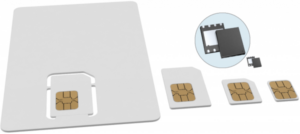
There are four main types of SIM cards on the basis of their physical size, although only the smallest retain relevancy in current times. SIM form factors are the defined sizes produced by subscriber identity modules (SIMs). SIM form factors are classified as 1FF, 2FF, 3FF, 4FF, and MFF2. Each SIM generation is smaller than the previous one. MFF2 is an abbreviation for the machine-to-machine form factor.
SIM cards and their dimensions have decreased over time, allowing product designers more freedom. Here are the dimensions of each SIM card form factor:
- 1FF: 85.6mm × 53.98mm × 0.76mm
- 2FF (Mini SIM): 25mm x 15mm x 0.76mm
- 3FF (Micro SIM): 15mm x 12mm x 0.76mm
- 4FF (Nano SIM): 12.3mm × 8.8mm × 0.67mm
- MFF2 (eSIM): 5mm x 6 mm x 1mm
What is the difference between IMEI, IMSI, ICCID and MSISDN numbers
Mobile networks use various unique codes to be able to dispatch accurately the services relevant to specific subscribers. IMEI, IMSI, ICCID and MSISDN are some of the key codes required for the identification of mobile devices.
IMEI is a 15-digit number assigned to every cellular device for each of its SIM slots; IMSI is a 15-digit number assigned to the SIM of a mobile subscriber; ICCID is a number that identifies the chip of each SIM card; MSISDN is the full mobile number including the country code and any prefixes.
| What is it linked to? | What does it look like? | |
|---|---|---|
| IMEI | Phone | 15 digits all numeric |
| IMSI | SIM | 15 digits all numeric |
| ICCID | SIM | ~20 digits all numeric |
| MSISDN | SIM | Full mobile number with country code and all prefixes |
Why does registration time take longer in some countries?
The Registration of a roaming SIM card may take longer than a local IMSI SIM at initial registration, because the roaming IMSI is doing a search for the best available network to connect to the first time it is connected in a new country.